Work with multiple AI models in one Playground
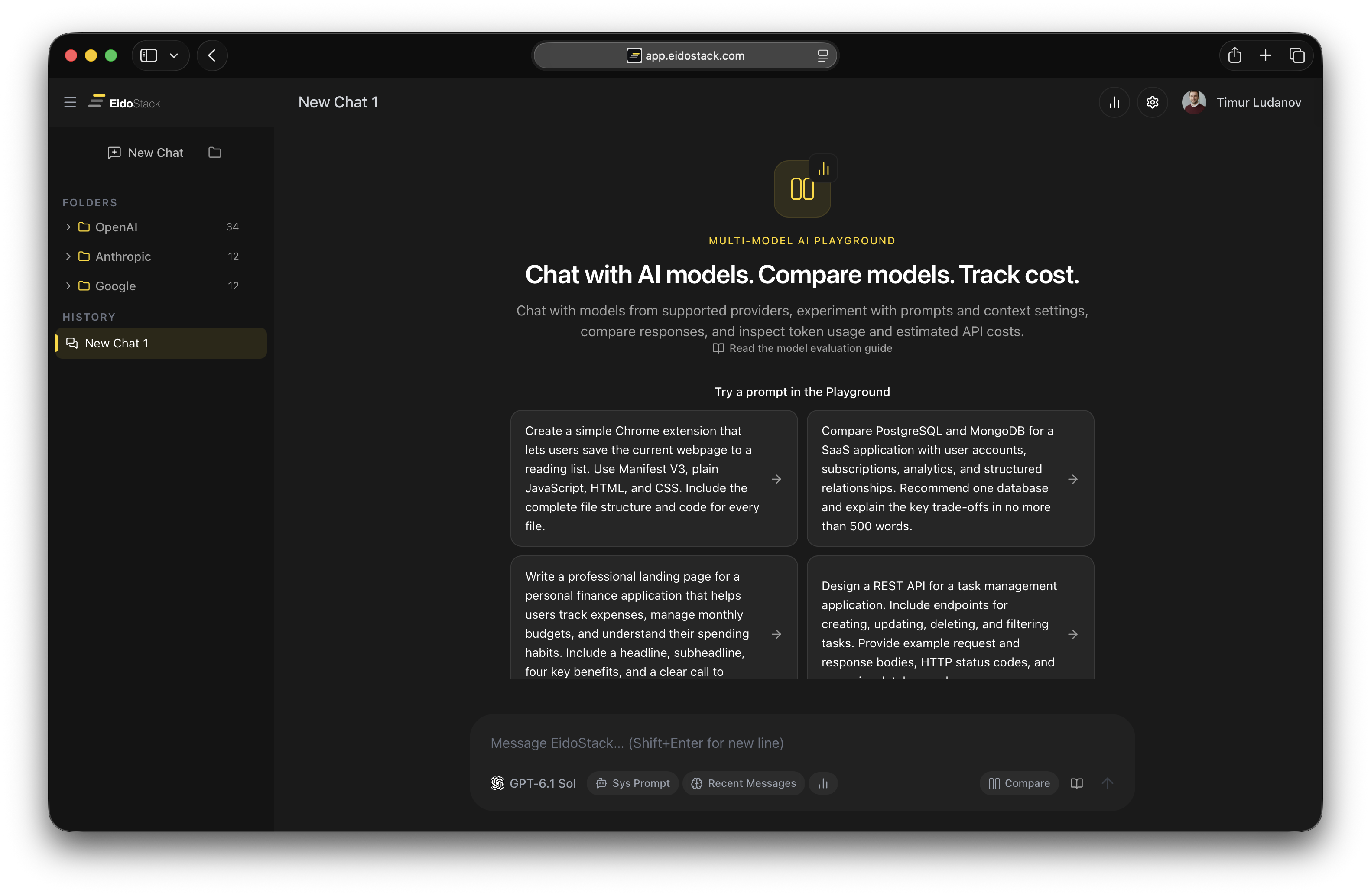
Chat with AI models from different providers, experiment with prompts, and compare responses in one interface. Track token usage, request costs, and context consumption. Bring your own API keys and stay in full control of your AI experiments.
No installation required. Connect your API key and start experimenting with models right in your browser.
The Problem
Different AI models. Different interfaces. Too much switching.
Working with multiple AI models shouldn't require a dozen open tabs.
Every provider offers its own Playground, interface, and tools. To test multiple models, you have to switch between platforms, copy prompts, and compare results manually.
01.
Too many separate interfaces
OpenAI, Anthropic, and Google offer different tools for working with their models. You have to switch platforms and get used to different interfaces every time.
02.
Comparing results is difficult
The same prompt can produce completely different responses. But when the results are spread across different tabs, comparing them is inconvenient.
03.
Not enough visibility into costs
During a typical AI conversation, it's not always clear how many tokens were used, how much a request cost, or how much of the context window the conversation occupies.
EidoStack brings it all together in one workspace.
The Solution
One Playground. Multiple AI models. Full control.
EidoStack provides one workspace for interacting with AI models from different providers.
Choose a model, send requests, explore responses, and experiment with settings. When you need to, switch to another model or compare multiple models at the same time.
Everything you need to experiment with AI models, all in one place.
Chat with AI models
Use a familiar chat interface to work with models from different providers. Ask questions, send prompts, and continue conversations.
Compare responses
Send one prompt to multiple models and view the results side by side. Discover differences in content, style, and response quality.
Experiment with prompts
Change system instructions, try different wording, and see how models respond to your changes.
Analyze usage
See input and output token counts, request costs, and context window usage.
Switching Models
Try different models without switching workspaces
New AI models are released all the time. Each offers its own capabilities, characteristics, and approach to generating responses.
Why limit yourself to one model?
With EidoStack, you can try different models in one interface and decide for yourself which one handles your task best.
Try another model
Switch between supported models without opening a separate Playground for each provider.
Compare results
Use the same prompt with multiple models and explore the differences in their responses.
Check the cost
Find out how many tokens each model used and how much the request cost.
Choose the right one
Use the model that best meets your requirements for quality, capabilities, and cost.
Don't limit yourself to one model when you can try several.
Multi-Provider Playground
OpenAI, Anthropic, and Google in one interface
Work with models from different AI providers through one Playground.
You no longer need to open a separate dashboard for each service to try a new model or repeat an experiment.
OpenAI
Work with supported OpenAI models using your own API key.
Anthropic
Experiment with Claude models, explore their responses, and compare results with other models.
Use Gemini models for your own tasks, prompts, and experiments.
One workspace
One interface for chats, model comparisons, request history, and usage analytics.
Your API keys
Connect your own provider accounts. Pay for model usage directly according to the relevant API pricing.
A familiar workflow
Choose a model, enter a prompt, and get a response. No need to learn a new interface every time.
Different providers. One Playground.
Real-World Use Cases
Experiment with AI using your own tasks
Public demos and ready-made examples don't always show how a model will perform in your particular case.
EidoStack lets you test models yourself using the real requests you work with.
Code generation and analysis
Test how different models write, explain, and analyze code.
Working with text
Compare the quality of writing, editing, translation, and text structuring.
Solving complex problems
Test how different models reason, follow instructions, and generate responses.
Structured responses
Test prompts that should return data in a specific format, such as JSON.
Building AI applications
Test model and prompt behavior before using them in your own applications.
Exploring model capabilities
Discover the strengths and weaknesses of different models by experimenting directly with their APIs.
Your tasks. Your prompts. Your experiments.
Prompt Experimentation
One prompt change can make all the difference. Test it.
A small change in wording can significantly affect an AI model's response.
But how do you know which change actually works?
In EidoStack, you can experiment with prompts, repeat requests, and compare results in one workspace.
Try different wording
Change instructions and observe how model responses change.
Compare models
Test the same prompt across multiple models to see differences in behavior.
Analyze costs
See how different prompts affect token usage and request costs.
Revisit previous results
Keep your conversation history so you don't lose the results of your experiments.
Don't guess which prompt is better. Experiment and compare.
System Prompts
Customize AI model behavior with system instructions
A system prompt defines a model's role, response style, behavior rules, and constraints.
But the same instruction can work differently across models.
EidoStack lets you experiment with system prompts and see how they affect the results.
Define the model's role
Set the context you need: AI assistant, technical expert, editor, analyst, or another specialized role.
Control response formats
Use instructions to get responses with the structure, style, and level of detail you need.
Compare model behavior
Test how accurately different models follow the same system instructions.
Experiment with context
Change how conversation history is passed to the model and explore its effect on responses.
Control not only what you ask, but also how AI responds.
Cost Tracking
Know the cost of every AI request
Different AI models have different usage costs. Even identical requests can result in different token consumption.
EidoStack helps you understand how many resources your experiments use.
Input tokens
See how many tokens are sent to the model with your request, system instructions, and context.
Output tokens
See how many tokens the model used to generate its response.
Request cost
Estimate the cost of each model request.
Compare costs
See how the cost of completing the same task differs across models.
Usage statistics
Analyze token usage and costs by model, provider, and time period.
Budget control
Use usage data to choose models and context strategies more deliberately.
Experiment freely. Stay in control of costs.
Context Window
Understand how AI uses context
Every AI model has a limited context window.
Conversation history, system instructions, and new messages take up space in that window and affect token usage.
EidoStack lets you visualize context usage and experiment with different strategies for building context.
Context visualization
See how much of the available context window is already in use.
Conversation history
Understand how much space message history takes up and how it affects subsequent requests.
System instructions
Estimate how much the system prompt contributes to the total input token count.
Context strategies
Experiment with sending the full history, the last message, or relevant snippets through RAG.
Compare models
Take differences in the available context windows of supported models into account.
Cost analysis
Understand how increasing context affects token counts and API request costs.
Context should no longer be an invisible part of an AI request.
Chat History
Your AI experiments, always within reach
Good results shouldn't disappear when you close a tab.
EidoStack keeps your chat history so you can return to previous conversations, review responses, and continue experimenting.
- Return to previous requests and responses without starting over.
- Use folders to group conversations by project, model, or task.
- Open existing conversations and continue chatting with AI.
- Review results, token usage, and the cost of model requests.
All your AI experiments in one organized workspace.
One Workspace
Everything you need to work with AI models in one place
EidoStack combines a familiar AI chat with tools that help developers explore model capabilities more deeply.
AI Chat
Chat with supported AI models through one interface.
Model Comparison
Send one prompt to multiple models and compare results side by side.
Prompt Testing
Experiment with prompts and system instructions.
Token & Cost Analytics
View token and cost statistics by model and provider.
Context Visualization
Analyze context window usage and try different strategies for passing conversation history.
Secure API Key Vault
Securely manage your own API keys with local encryption.
Less switching between tools. More room to experiment.
BYOK Security
Your API keys. Your control.
EidoStack follows the Bring Your Own Key (BYOK) approach.
Connect your own AI provider API keys and stay in control of how they are used.
- Local encryption API keys are encrypted directly in your browser using the Web Crypto API.
- Master password protection Your encrypted key vault is protected by a master password.
- Direct provider connections In normal Playground mode, requests are sent directly to the API providers. Keys are not stored on EidoStack servers.
- Your costs Pay providers directly for model usage according to their API pricing.
- Backup and restore Create an encrypted backup of your key vault and restore it when needed.
Use different AI models while keeping control of your keys and costs.
Who It Is For
A Playground for developers and everyone working with AI models
EidoStack is built for people who need more than a single AI chat and want to experiment freely with models from different providers.
Developers
AI engineers
Prompt engineers
AI startups
AI consultants
Technical teams
If you work with multiple AI models, EidoStack is built for you.
Why EidoStack
More than a regular AI chat
A regular AI chat lets you ask a question and get an answer.
EidoStack lets you work with different models, compare them, and better understand what happens with every request.
Not just one AI chat
Use models from multiple providers without being tied to a single service.
Not just responses
Compare results, test prompts, and explore differences in model behavior.
Not just token counts
Understand request costs, context consumption, and model usage.
Not just conversation history
Save and organize your experiments so you can return to them at any time.
Not just an API interface
Get a ready-to-use browser workspace without building your own model-testing tools.
One Playground instead of several separate tools.
Pricing
Start for free. Experiment without unnecessary limits.
Use EidoStack with your own API keys. Start with the free plan and upgrade to Pro when you need more capabilities.
Free
Evaluate AI models with your own API key, inspect token and cost usage, understand context usage, and experience the core EidoStack workflow within these limits.
- Maximum configured API providers: 1
- Maximum chats: 5
- Maximum messages per chat: 50
- Compare models in up to 5 chats
- Inspect token usage and costs
- Understand context usage
Pro
Save with annual billing
Compare AI models, analyze costs and token usage, and unlock the full EidoStack workflow.
- Unlimited API providers
- Unlimited chats
- Unlimited messages per chat
- Compare models across configured providers
- Full access to EidoStack functionality
- Analyze costs, token usage, and context usage
Billed annually. Full access. Cancel anytime.
Pay AI API providers directly. The EidoStack subscription is billed separately and gives you access to Playground features.
ONE PLAYGROUND. MULTIPLE AI MODELS.
All your AI models. One Playground.
Stop switching between different interfaces. Chat with AI models, experiment with prompts, compare responses, and track costs — all in one workspace. Connect your own API key and start exploring what AI can do today.
Get Started for FreeNo installation required. Works right in your browser.